Page 1 of 1
[solved] Blocks and Layers
Posted: Wed Dec 29, 2021 4:27 pm
by yeti01
Following this description does not fit to the actual behaviour:
https://qcad.org/en/tutorial-layers-blo ... attributes
Example:
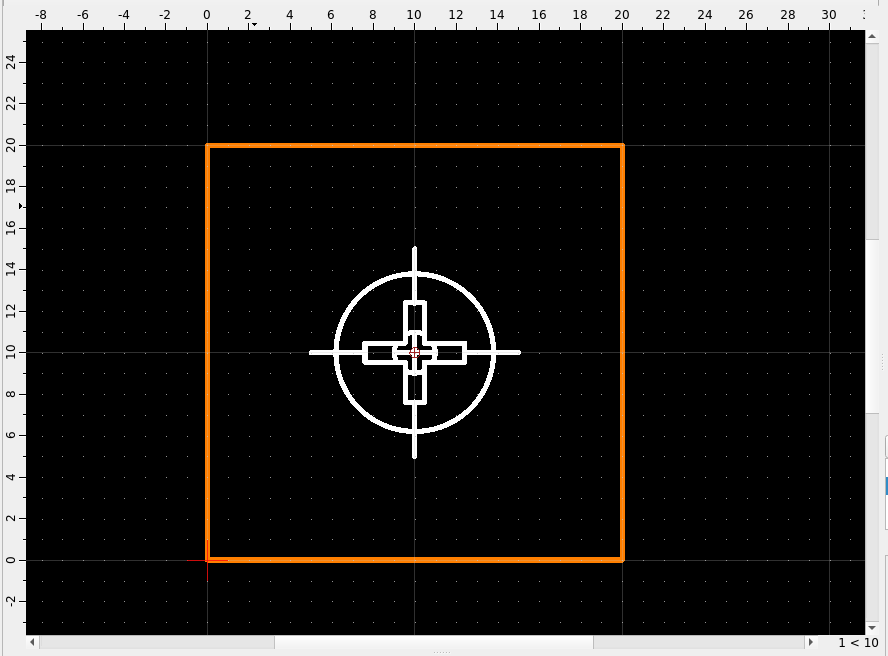
- Drawing consists of 2 layers ("0"=white, "1"=orange).
- The 4 lines are drawn on layer "1". Color chosen is "By Layer". So they are shown in orange.
- The symbol in the middle is a block from a library, drawn on layer "1". Color chosen is "By Layer". But it is white.
I would have expected that the block is also shown in orange.
The example file is added below.
- Screenshot at 2021-12-29 15-08-12.png (17.92 KiB) Viewed 8472 times
Re: Blocks and Layers
Posted: Wed Dec 29, 2021 7:43 pm
by Husky
yeti01 wrote: ↑Wed Dec 29, 2021 4:27 pm
Example:
- Drawing consists of 2 layers ("0"=white, "1"=orange).
True
yeti01 wrote: ↑Wed Dec 29, 2021 4:27 pm
- The 4 lines are drawn on layer "1". Color chosen is "By Layer". So they are shown in orange.
True
yeti01 wrote: ↑Wed Dec 29, 2021 4:27 pm
- The symbol in the middle is a block from a library, drawn on layer "1". Color chosen is "By Layer". But it is white.
I would have expected that the block is also shown in orange.
Nope. The entities in the block are drawn on layer 0 and inserted on layer 1. If your QCAD Layer compatibility is set to "Layer 0 behaves differently" then every entity in your block drawn on layer 0 will adapt the color from the layer in your drawing on which it is inserted.
Test it: Insert the blocks in your drawing on layer 1 and then on layer 0 ...

Re: Blocks and Layers
Posted: Thu Dec 30, 2021 12:55 pm
by yeti01
Hi Husky, thanks for your help.
Your suggestion works for symbols drawn on layer 0. Great. But unfortunately not for symbols drawn on other layers.
Try this:
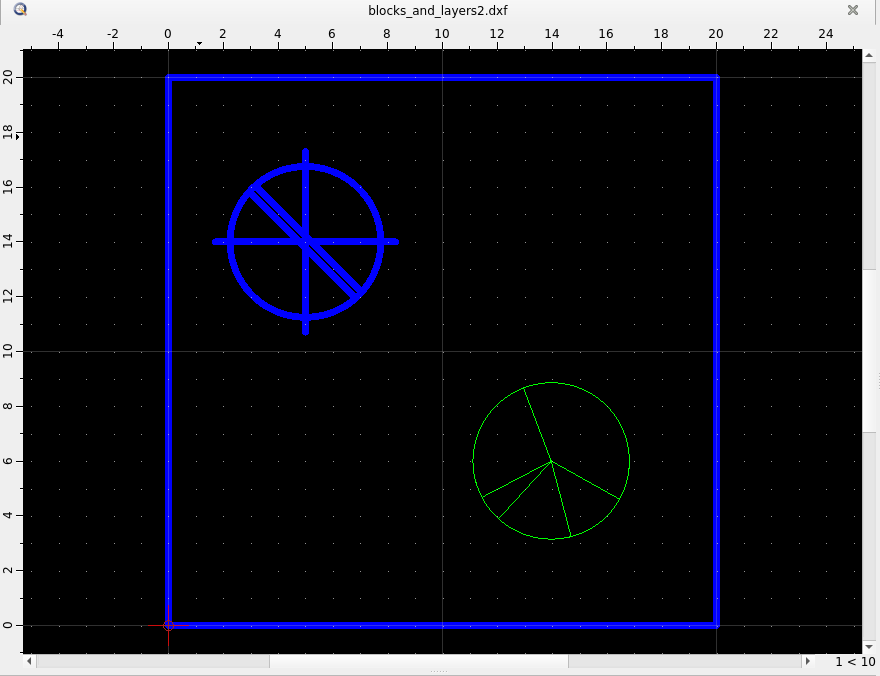
- Create a layer 1 (blue). Draw something (e.g. a rectangle)
- On layer 1 insert a symbol that is drawn on layer 0 (top left). It is shown in blue.
- On layer 1 insert a symbol that is drawn on layer xyz (bottom right). It is always shown in the color of layer xyz.
How can I change the color/attributes of such symbols (w/o changing the symbol itself)?
- Screenshot at 2021-12-30 11-31-58.png (19.79 KiB) Viewed 8389 times
Re: Blocks and Layers
Posted: Thu Dec 30, 2021 11:50 pm
by Husky
yeti01 wrote: ↑Thu Dec 30, 2021 12:55 pm
How can I change the color/attributes of such symbols (w/o changing the symbol itself)?
Use different layer within the block,
or
use custom colors for single entities in your block,
or
explode the block after inserting it,
or
switch your Layer Compatibility to "Layer 0 behaves like a regular Iayer (QCAD)",
etc. etc. etc.
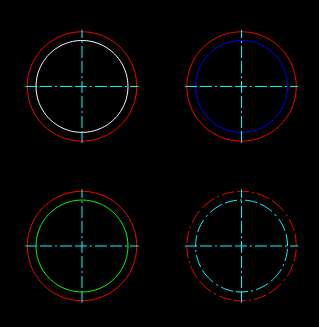
This example circle is one block inserted on different layer. You may play with it to see what you can do to control the attributes in a block.
- Husky-2021.12.30-05.png (16.71 KiB) Viewed 8355 times
Re: Blocks and Layers
Posted: Fri Dec 31, 2021 2:57 pm
by yeti01
After reading
https://qcad.org/en/tutorial-layers-blo ... attributes again and again and trying to reproduce the example in the article, I noticed 2 important points:
- Only entities of a block that have set color/attributes to "By Block" change their color/attributes according to the layer of the drawing the block is placed on.
- What was confusing me, is the description below. In my opinion the 3 red marked "2" should be replaced by "1".
So if you want to create a symbol library, and you want the symbols to inherit the color/attributes of the layer of your drawing, be sure that the entities of the blocks (symbols) have color/attributes set to
"By Block".

- 2021-12-31_14-25.png (142.75 KiB) Viewed 8316 times