Page 1 of 1
Setting line length of a parallell line how
Posted: Mon Dec 13, 2021 1:54 pm
by Akki
When I implement a parallell line I also need to define the lengt of that implemented line from a certain point-how?
Version:
3.27.0.0 (3.27.0)
Windows 10 latest stand 21H1
Version: 19043.1348
Re: Setting line length of a parallell line how
Posted: Mon Dec 13, 2021 2:14 pm
by andrew
Generally speaking, one usually wouldn't worry about the exact line length and construct everything else that is known around it. In the end, one can simply trim the objects to the limiting objects.
Since no drawing is provided, I'm assuming a situation as follows:
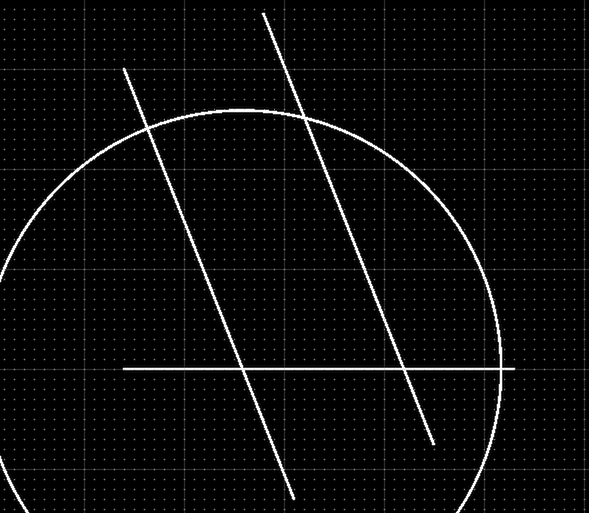
- Screenshot 2021-12-13 at 14.03.39.png (58.43 KiB) Viewed 5890 times
Which can be trimmed in a few clicks to the desired contour:
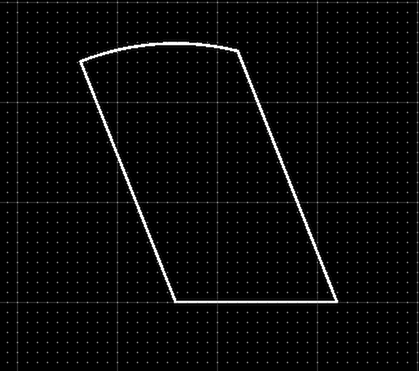
- Screenshot 2021-12-13 at 14.04.00.png (29.42 KiB) Viewed 5890 times
In other words: don't try to draw each object directly with its desired start and end point. Instead, simply create all that is given and trim in the end.
Re: Setting line length of a parallell line how
Posted: Mon Jan 03, 2022 9:59 am
by Husky
Topic moved to "QCAD Community Edition"